
如果你用 OpenClaw(或类似的 Agent 框架)一段时间,肯定遇到过这些场景:
- 每次
/new或/reset之后,重要上下文就消失了,希望自动归档到 Obsidian / 文件 - 收到某些关键词(如「API Key」「Token」)的消息,希望立即阻断转发
- Gateway 每次启动都要手动跑几个脚本,希望开机自动执行
- 想做轻量的 IM 接入,但官方文档里的"webhook"那一节又看起来吓人
- 想在 agent 每次回复前/后插入一些自定义逻辑(审计、过滤、补全)
这些都属于"事件驱动自动化"——而 OpenClaw 的 Hooks 就是为此设计的。
这篇教程的目标:让你看完之后能独立写出一个 hook,并理解什么时候该用 internal hooks、什么时候必须上 typed plugin hooks、什么时候反而应该用 webhooks。
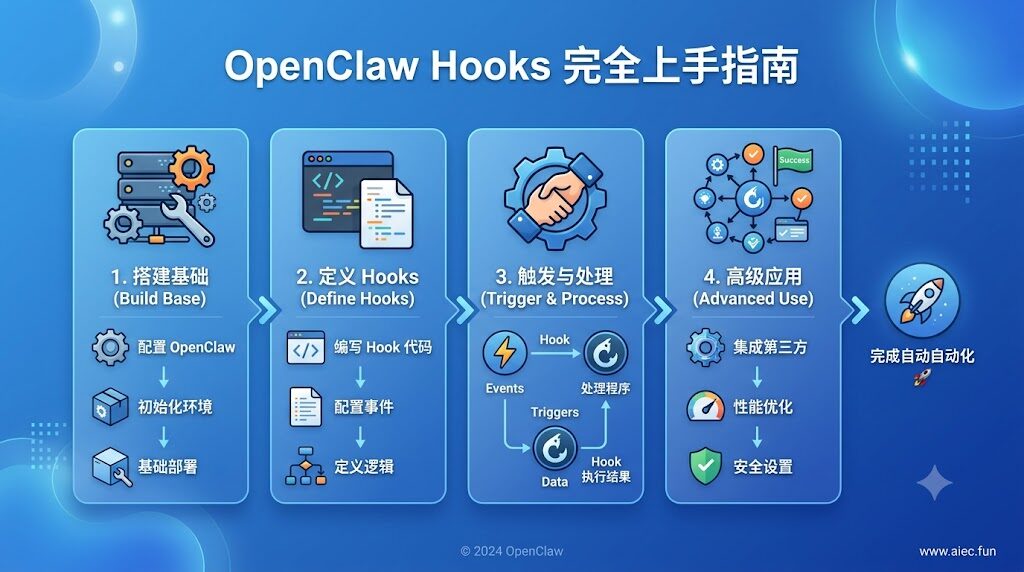
1. 什么是 OpenClaw Hooks
Hooks 是一段"在某个事件发生时自动执行的代码"。和 Claude Code 的 hooks 类似,但 OpenClaw 设计了三种并存。
1.1 核心抽象
OpenClaw 把所有 hook 都抽象成"订阅事件 + 提供处理函数"的模式:
- 你订阅一个或多个事件(如
command:new、message:sent) - Gateway 内部维护一个事件总线
- 当某个事件触发时,所有订阅了这个事件的 hook handler 被异步调用
- handler 可以读 context(含 session、message、工具引用),可以写文件、调工具、发消息
这是观察者模式的标准实现——你不需要碰 Gateway 主循环。
1.2 为什么需要 hooks
常见的三个动机:
- 持久化:context 是易失的(reset/compact 都会丢),hooks 是把重要信息固化到文件/数据库的桥梁
- 审计:谁在什么时间做了什么操作?hook 自动写审计日志
- 集成:让 OpenClaw 与外部系统(IM、CI、监控)双向打通
如果你只用 OpenClaw 跟 LLM 聊天,可能永远用不上 hooks;但只要你想"让 OpenClaw 融入你的工作流",hooks 几乎是必经之路。
| 类型 | 触发方式 | 适用场景 | 难度 |
|---|---|---|---|
| Internal Hooks | 文件级,HOOK.md + handler.ts | /new//reset 归档、消息审计、开机自检 | ⭐ 易 |
| Typed Plugin Hooks | API 级,api.on(…) | 拦截工具调用、重写 prompt、阻止消息 | ⭐⭐⭐ 难 |
| Webhooks | 外部 HTTP 端点反向触发 | Gmail Pub/Sub、CI/CD、第三方回调 | ⭐⭐ 中 |
核心区别一句话:
- Internal hooks = "运维级自动化"(发个归档、写个日志)
- Typed plugin hooks = "运行时控制"(拦工具、改 prompt、cance 消息)
- Webhooks = "外部系统反向推 OpenClaw"
剩下两节分别讲后两者。这章先讲最容易上手的 Internal Hooks。
2. Internal Hooks:文件级自动化
2.1 工作原理
每个 hook 是一个目录,包含两个文件:
my-hook/
├── HOOK.md          # 元数据 + 事件订阅
└── handler.ts       # 处理逻辑(TypeScript)
OpenClaw Gateway 启动时会自动扫描这些目录,把订阅了事件的 hook 加载进内存;当事件触发时,异步调用对应的 handler。
整个流程你不需要碰——只要把目录放到正确位置就行。
2.2 hook 放在哪
| 来源 | 默认路径 |
|---|---|
| OpenClaw 自带 | bundled(不可改) |
| 用户/插件管理 | ~/.openclaw/managed_hooks/ 或 ~/.openclaw/hooks/ |
| 自定义 | ~/.openclaw/hooks/transforms/(需在配置中启用) |
最常用的入门方式:在 ~/.openclaw/hooks/ 下建自己的子目录。
2.3 HOOK.md 格式
---
name: session-memory
description: "Save session context to memory when /new or /reset command is issued"
metadata:
  {
    "openclaw": {
      "emoji": "💾",
      "events": ["command:new", "command:reset"],
      "requires": { "bins": ["node"] }
    }
  }
---

# Session Memory

每次收到 `/new` 或 `/reset` 时,把当前 session 的关键上下文快照写入
`~/.openclaw/sessions/<sessionKey>.snap.json`。关键字段:
| 字段 | 必填 | 说明 |
|---|---|---|
| name | ✅ | hook 唯一 ID(小写字母数字) |
| description | ✅ | 一句话描述 |
| metadata.openclaw.emoji | ❌ | CLI 显示用 |
| metadata.openclaw.events | ✅ | 订阅的事件列表 |
| metadata.openclaw.requires.bins | ❌ | 依赖命令(如 node/curl) |
| metadata.openclaw.os | ❌ | 限定平台(darwin/linux/win32) |
2.4 支持的事件清单
| 事件 | 触发时机 |
|---|---|
| command:new | /new 命令 |
| command:reset | /reset 命令 |
| command:stop | /stop 命令 |
| command | 任何命令事件(通用监听器) |
| session:compact:before | 压缩历史前 |
| session:compact:after | 压缩历史后 |
| session:patch | 会话属性被修改 |
| agent:bootstrap | workspace bootstrap 文件注入前 |
| gateway:startup | Gateway 启动完成 + hooks 加载完成 |
| gateway:shutdown | Gateway 开始关闭 |
| gateway:pre-restart | Gateway 即将重启 |
| message:received | 收到任意渠道消息 |
| message:transcribed | 音频转写完成 |
| message:preprocessed | 媒体/链接预处理完成 |
| message:sent | 发出消息已送达 |
2.5 handler.ts 模板
// handler.ts - Session Memory Hook 示例
import type { HookHandler, HookContext } from "openclaw/hooks";

export default async function handler(
  event: string,
  context: HookContext
): Promise<void> {
  if (event !== "command:new" && event !== "command:reset") return;

  const { sessionKey, session } = context;
  const ts = new Date().toISOString();
  const path = `~/.openclaw/sessions/${sessionKey}.snap.json`;

  await Bun.write(path, JSON.stringify({
    timestamp: ts,
    event,
    sessionKey,
    summary: session?.summary ?? "",
    messages: session?.messages?.slice(-10) ?? [],
  }, null, 2));

  console.log(`[session-memory] snap saved to ${path}`);
}
注意 3 点:
default export一个 async 函数,签名是(event, context) => Promise<void>- 不要 throw——错误会被静默吞掉(要调试用 console.log + 看 gateway 日志)
- 返回 void 或 { cancel: true } —— 后者用于"取消事件"(仅 typed hooks 支持)
2.6 实战示例 1:每次 /reset 时归档到 Obsidian
假设你用 Obsidian 管理笔记,每次 /reset 时希望自动把上下文归档到 ~/Obsidian-Vaults/claw/每日/_inbox/。
Step 1:建 hook 目录
mkdir -p ~/.openclaw/hooks/obsidian-archive
cd ~/.openclaw/hooks/obsidian-archive
Step 2:写 HOOK.md
---
name: obsidian-archive
description: "每次 /reset 把当前会话摘要归档到 Obsidian"
metadata:
  {
    "openclaw": {
      "emoji": "📚",
      "events": ["command:reset"]
    }
  }
---

# Obsidian Archive
Step 3:写 handler.ts
import { writeFile } from "node:fs/promises";
import { join } from "node:path";
import { homedir } from "node:os";

export default async function handler(event, ctx) {
  if (event !== "command:reset") return;

  const now = new Date();
  const dateStr = now.toISOString().slice(0, 10);  // YYYY-MM-DD
  const timeStr = now.toTimeString().slice(0, 5);  // HH:MM

  const targetDir = join(homedir(), "Obsidian-Vaults/claw/每日/_inbox");
  const filename = `${dateStr}_${timeStr.replace(":", "")}_reset.md`;
  const target = join(targetDir, filename);

  const body = `---
date: ${dateStr} ${timeStr}
session: ${ctx.sessionKey}
event: ${event}
---

## 会话摘要

${ctx.session?.summary ?? "(无摘要)"}

## 最后 10 条消息

${(ctx.session?.messages ?? []).slice(-10).map((m, i) =>
  `${i + 1}. **${m.role}**: ${m.content?.slice(0, 200) ?? ""}`
).join("\n")}
`;

  await writeFile(target, body, "utf8");
  console.log(`[obsidian-archive] ${target}`);
}
Step 4:启用 hook
openclaw hooks enable obsidian-archiveStep 5:触发
在任意 OpenClaw 会话里发 /reset,然后去 Obsidian 看 _inbox/ 目录——会多出一份带元数据的归档。
2.7 实战示例 2:敏感关键词阻断
如果担心某些关键词(如 API Key、密码)被外发到 IM,可以写一个 message:sent hook 做正则阻断:
// ~/.openclaw/hooks/sensitive-block/handler.ts
export default async function handler(event, ctx) {
  if (event !== "message:sent") return;

  const FORBIDDEN = [
    /sk-[a-zA-Z0-9_-]{20,}/,         // OpenAI / Anthropic key
    /ghp_[a-zA-Z0-9]{36}/,          // GitHub PAT
    /\b1[3-9]\d{9}\b/,              // 中国大陆手机号
  ];

  const content = ctx.message?.content ?? "";
  for (const re of FORBIDDEN) {
    if (re.test(content)) {
      console.error(`[sensitive-block] BLOCKED: ${re.source}`);
      // 触发 IM 撤回(需配合 message 工具)
      await ctx.tools?.message?.recall?.({ messageId: ctx.message.id });
      return;
    }
  }
}
2.8 管理命令
openclaw hooks list              # 列出所有 hooks
openclaw hooks enable <name>     # 启用
openclaw hooks disable <name>    # 禁用
openclaw hooks info <name>       # 详细信息(事件、文件路径)
openclaw hooks check             # 检查所有 hooks 状态
2.9 当前 OpenClaw 自带的 8 个 hooks
装好 OpenClaw 后默认就有这些 hooks,无需自己写:
| 名称 | emoji | 作用 |
|---|---|---|
| boot-md | 🚀 | 启动时执行 BOOT.md |
| bootstrap-extra-files | 📎 | 注入额外的 bootstrap 文件 |
| command-logger | 📝 | 把所有命令事件写入审计日志 |
| compaction-notifier | 🧹 | 压缩会话时发飞书通知(默认 disabled) |
| session-memory | 💾 | /new//reset 时存档会话 |
| clawsec-advisory-guardian | 🛡️ | 检测 skill 风险并需用户确认 |
| post-upgrade-selfcheck | ✅ | 网关启动后自检版本/端口 |
| self-improvement | 🧠 | bootstrap 时注入自我改进提醒 |
直接用 openclaw hooks list 看你环境里实际有几个(不同版本略有差异)。
3. Typed Plugin Hooks:运行时控制
Internal hooks 适合"发个通知、写个文件",但如果要做阻止工具调用、取消出站消息、重写 prompt 这种带策略的事,需要 typed plugin hooks。
3.1 区别 vs Internal Hooks
| 维度 | Internal Hook | Typed Plugin Hook |
|---|---|---|
| 形式 | 文件目录 | 插件代码 api.on(…) |
| 能否 cancel/block | ❌(仅观察) | ✅ |
| 优先级/合并 | ❌ | ✅ |
| 拦截 prompt | ❌ | ✅ beforepromptbuild |
| 拦截工具调用 | ❌ | ✅ beforetoolcall / aftertoolcall |
| 拦截消息 | ❌(仅日志) | ✅ beforeagentreply 可 cancel |
| 适合谁 | 运维/用户 | 插件开发者 |
3.2 最小插件示例
// ~/.openclaw/plugins/my-plugin/index.ts
import type { OpenClawPlugin } from "openclaw/plugin";

const plugin: OpenClawPlugin = {
  name: "my-plugin",
  version: "1.0.0",

  hooks: {
    // 在 prompt 构建前注入上下文
    before_prompt_build: async (ctx, next) => {
      ctx.prompt += "\n\n[Plugin] 提醒:你正在使用 my-plugin v1.0.0";
      await next();
    },

    // 拦截危险命令
    before_tool_call: async (ctx, next) => {
      const tool = ctx.toolCall;
      if (tool.name === "exec" && /rm -rf/.test(tool.args.command ?? "")) {
        console.error(`[my-plugin] BLOCKED: ${tool.args.command}`);
        ctx.cancel("危险命令:禁止执行 rm -rf");
        return;  // 不调用 next() 即为 block
      }
      await next();
    },

    // agent 回复后过滤敏感词
    before_agent_reply: async (ctx, next) => {
      await next();  // 先让 agent 输出
      ctx.reply = ctx.reply.replace(/sk-[a-zA-Z0-9_-]{20,}/g, "[REDACTED]");
    },
  },
};

export default plugin;关键点:
ctx.cancel(reason)取消后续流程await next()表示"放行到下一阶段"- 不调用
next()= 直接阻断 before_agent_reply中改ctx.reply会改输出
3.3 加载插件
把插件目录放到 ~/.openclaw/plugins/ 下,然后在配置中启用:
{
  "plugins": {
    "entries": {
      "my-plugin": {
        "enabled": true,
        "path": "~/.openclaw/plugins/my-plugin"
      }
    }
  }
}
4. Webhooks:外部触发 OpenClaw
前两类是"OpenClaw 内部事件触发 hook",webhook 则是反向——外部系统主动调用 HTTP 端点,触发 OpenClaw 工作。
4.1 典型场景
- Gmail Pub/Sub:收到新邮件 → 触发 OpenClaw 处理
- GitHub webhook:PR 合入 → 触发代码审查 agent
- CI/CD:pipeline 失败 → 触发排查 agent
- 定时任务:替代 cron 的另一种选择
- 用户主动触发:自建面板上点按钮 → 跑某个 agent 任务
4.1.1 Webhook 与 Cron 的区别
| 维度 | Cron | Webhook |
|---|---|---|
| 触发方 | OpenClaw 内部定时器 | 外部 HTTP 调用 |
| 延迟 | 取决于 cron 表达式 | 实时(< 1s) |
| 鉴权 | gateway token | hooks.token(独立) |
| 适用 | 周期性任务 | 事件驱动任务 |
如果你需要"每天早上 8 点跑一次",用 cron;如果你需要"GitHub PR 提交流程跑一次",用 webhook。
4.1.2 安全边界
Webhooks 默认暴露在 gateway 的端口(默认 18789),意味着:
- 必须设
hooks.token,否则任何人都能触发你的 agent - 建议把
hooks.path设为非默认(如/mysecret-hooks),降低被扫到的概率 - 建议用防火墙或 reverse proxy 限制
/hooks/*只能内网/特定 IP 访问 - 永远不要把
hooks.token提交到 git 仓库(用 CI secret 注入)
4.2 启用 webhooks
{
  "hooks": {
    "enabled": true,
    "token": "your-secret-token-here",     // 必须设置!
    "path": "/hooks",                       // 默认 /hooks
    "defaultSessionKey": "hook:ingress",
    "allowedAgentIds": ["hooks", "main"],
    "allowedSessionKeyPrefixes": ["hook:"]
  }
}
⚠️ 强制规则:
hooks.enabled=true必须配合非空hooks.tokenhooks.token必须与 gateway 主密码不同(会被openclaw security audit标 critical)hooks.path不能是/(用/hooks等子路径)allowedSessionKeyPrefixes强烈建议限定为["hook:"]
4.3 POST /hooks/wake
最简单的 webhooks 形式——外部触发 agent 任务。
curl -X POST http://127.0.0.1:18789/hooks/wake \
  -H "Authorization: Bearer your-secret-token-here" \
  -H "Content-Type: application/json" \
  -d '{
    "sessionKey": "hook:gmail:msg-abc123",
    "agentId": "hooks",
    "message": "收到一封新邮件,请摘要给我"
}'响应:
{
  "ok": true,
  "sessionKey": "hook:gmail:msg-abc123",
  "wakeAt": "2026-07-21T14:00:00+08:00"
}
4.4 POST /hooks/agent
更完整的形式,可以携带附件、转写媒体等:
curl -X POST http://127.0.0.1:18789/hooks/agent \
  -H "Authorization: Bearer your-secret-token-here" \
  -H "Content-Type: application/json" \
  -d '{
    "sessionKey": "hook:ci:pipeline-123",
    "agentId": "hooks",
    "message": "CI 失败请排查",
    "attachments": [
      { "type": "file", "name": "log.txt", "url": "https://example.com/log" }
    ]
  }'
4.5 实战示例 3:GitHub PR 合入触发 code review
# .github/workflows/claw-review.yml
name: Trigger Claw Code Review
on:
  pull_request:
    types: [closed]

jobs:
  trigger:
    if: github.event.pull_request.merged == true
    runs-on: ubuntu-latest
    steps:
      - name: Trigger OpenClaw
        run: |
          curl -X POST ${{ secrets.OPENCLAW_HOOK_URL }}/hooks/agent \
            -H "Authorization: Bearer ${{ secrets.OPENCLAW_HOOK_TOKEN }}" \
            -H "Content-Type: application/json" \
            -d '{
              "sessionKey": "hook:gh:pr-${{ github.event.pull_request.number }}",
              "agentId": "code-reviewer",
              "message": "请审查 PR #${{ github.event.pull_request.number }} 的代码变更"
            }'
5. 三类 Hooks 的选型决策树
遇到需求时按这个顺序判断:
需求是什么?
│
├── "我希望 agent 行为被改变/拦截"
│   └── Typed Plugin Hooks
│       (拦截工具、重写 prompt、cancel 消息)
│
├── "我希望自动化一些副作用"
│   └── 是文件操作?日志?外部 API 调用?
│       │
│       ├── 是 → Internal Hooks
│       └── 否(需要更强控制)
│           └── Typed Plugin Hooks
│
└── "我希望外部系统触发 OpenClaw"
    └── Webhooks
(Gmail / GitHub / 自建面板)经验法则:
- 80% 的需求用 Internal Hooks 就够了
- 想做"安全护栏"(防 rm -rf、防泄漏)→ 必须 Typed Plugin Hooks
- 想做"外部集成"→ 必须 Webhooks
6. 常见踩坑
6.1 Hook 不触发?
排查清单:
openclaw hooks list看 hook 状态是不是✓ readyopenclaw hooks info <name>检查 events 字段- 看 gateway 日志(
~/.openclaw/logs/gateway.log)有没有加载错误 - 确认 HOOK.md 里
events字段拼写正确(command:new不是command:new_event)
6.2 Hook 改了但没生效?
OpenClaw 不热重载 hook 代码。改完 handler.ts 必须重启 gateway:
openclaw gateway restart # 仅在 hook 修改后⚠️ 但配置变更(如 openclaw.json)不需要重启——Gateway 支持热加载。
6.3 Hook 报错了 Gateway 整个挂掉?
不会。每个 hook 在独立 try/catch 中执行,单个 hook 抛错不影响其他 hook,也不影响 Gateway。但你的 hook 报错时只会在 gateway 日志里出现一行,不会主动通知——务必自己写 console.log 调试。
6.4 Hooks 占满 CPU?
Hook handler 默认同步执行。如果你的 hook 处理很重(解析大文件、调外部 API),建议:
- 用
await ctx.tools?.exec?.(...)异步派发 - 或在 handler 内加并发控制(
p-limit等)
6.5 Webhook 404?
检查路径是否以 /hooks 开头(不是 /),且 hooks.enabled=true 已在配置中设置。
6.6 Webhook 401?
hooks.token 没设,或 Authorization header 错了。OpenClaw 不接受 query string 的 token(避免日志泄漏)——必须用 header。
7. 调试技巧
7.1 看 hook 执行日志
tail -f ~/.openclaw/logs/gateway.log | grep -i hook7.2 用 command-logger hook 验证事件触发
OpenClaw 自带 command-logger 会把所有命令事件写入审计日志。启用后:
openclaw hooks enable command-logger
tail -f ~/.openclaw/logs/command-audit.jsonl
7.3 临时调试:在 handler 里 console.log
export default async function handler(event, ctx) {
  console.log("[my-hook] event:", event, "sessionKey:", ctx.sessionKey);
  // ...你的逻辑
}
7.4 验证 webhook 端点
# 用 curl 测试 wake 端点
curl -X POST http://127.0.0.1:18789/hooks/wake \
  -H "Authorization: Bearer your-token" \
  -H "Content-Type: application/json" \
  -d '{"sessionKey":"hook:test","agentId":"main","message":"hello"}'
成功的响应是 {"ok":true,...},错误时会有具体 reason 字段(如 invalid_token、unknown_agent)。
8. 进阶:写一个完整的"开机自检" hook
把 2.6、4.3 串起来——你已经有 /reset 归档、webhook 触发能力了,再补一个"Gateway 启动时自检并飞书通知"就完整了。
Step 1:建 hook 目录
mkdir -p ~/.openclaw/hooks/startup-selfcheckStep 2:HOOK.md
---
name: startup-selfcheck
description: "Gateway 启动后自检版本/端口/磁盘,异常时飞书通知"
metadata:
  {
    "openclaw": {
      "emoji": "✅",
      "events": ["gateway:startup"]
    }
  }
---

# Startup Selfcheck
Step 3:handler.ts
import { statfs } from "node:fs/promises";

export default async function handler(event, ctx) {
  if (event !== "gateway:startup") return;

  const checks = {
    timestamp: new Date().toISOString(),
    openclawVersion: await ctx.tools?.exec?.({ command: "openclaw --version" }),
    port18789: await checkPort(18789),
    diskFreeGB: await getDiskFree(),
  };

  console.log("[startup-selfcheck]", JSON.stringify(checks, null, 2));

  // 磁盘 < 5GB 时飞书告警
  if (checks.diskFreeGB < 5) {
    await ctx.tools?.message?.send?.({
      channel: "feishu",
      target: "user:YOUR_OPEN_ID",
      message: `⚠️ Gateway 启动后磁盘只剩 ${checks.diskFreeGB.toFixed(1)} GB,请清理!`,
    });
  }
}

async function checkPort(port: number): Promise<boolean> {
  try {
    const res = await fetch(`http://127.0.0.1:${port}/health`);
    return res.ok;
  } catch {
    return false;
  }
}

async function getDiskFree(): Promise<number> {
  const s = await statfs("/");
  return (s.bavail * s.bsize) / 1024 / 1024 / 1024;
}
Step 4:启用
openclaw hooks enable startup-selfcheck
openclaw gateway restart
重启后你应该能在日志看到 [startup-selfcheck] 输出。
写在最后
OpenClaw 的 hooks 体系设计得很务实——Internal Hooks 让普通用户能零代码/几行代码搞定 80% 的自动化,Typed Plugin Hooks 给插件开发者足够的运行时控制力,Webhooks 把外部世界接进来。三者各司其职,不互相替代。
我的建议:
- 先用 Internal Hooks 试水,把"开机要跑什么、/reset 要存什么"自动化掉
- 碰到"必须拦住某个动作"的需求,再升级到 Typed Plugin Hooks
- 真正要接外部系统(Gmail / CI / 自建面板),才上 Webhooks
别一上来就写 typed plugin——80% 的需求 Internal Hooks 就够用。
需要更多场景示例或某类 hook 的深入用法,可以评论区告诉我,我会按需补充。